5.2. Movement tab
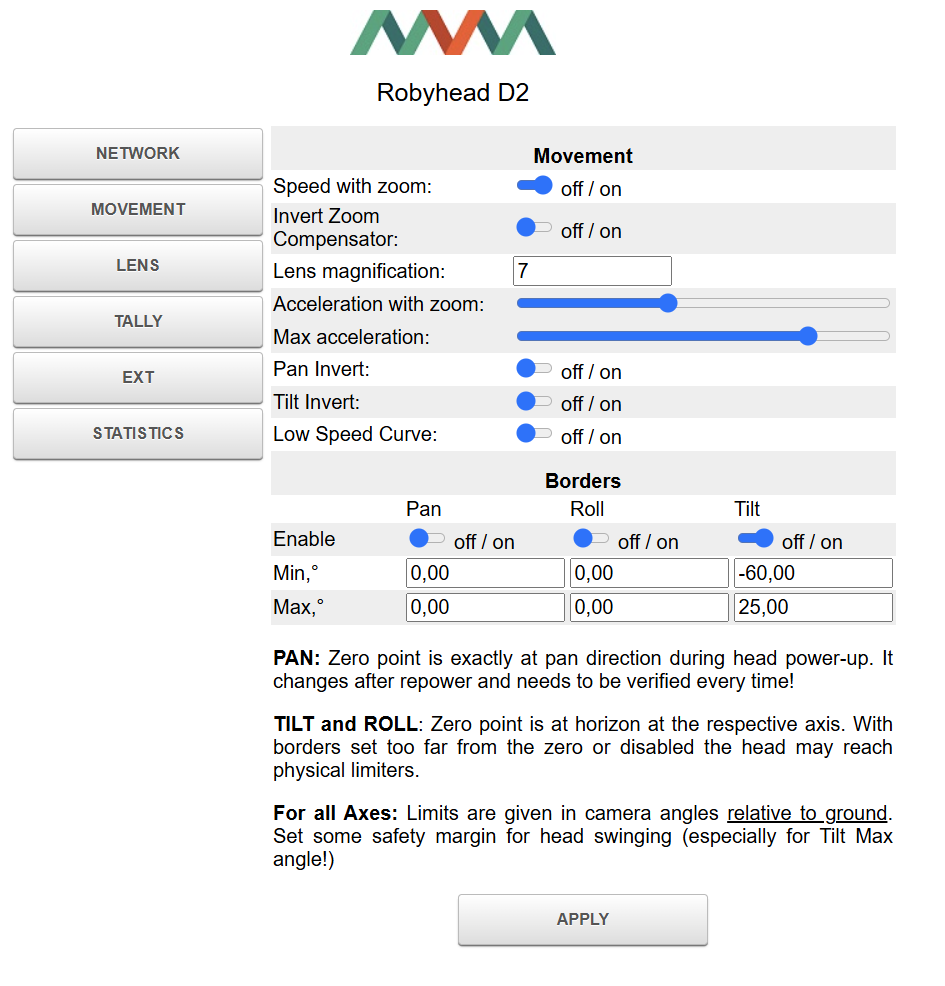
• Speed with zoom – enables/disables the "Zoom Compensator" function.
This function scales the maximum speed of the pan-tilt unit relative to the current zoom value.
When enabled, the closer the shot (more zoomed in), the slower the pan-tilt unit moves for the same
joystick deflection.
• Lens magnification – Sets the scaling coefficient for the "Speed with zoom" function.
If the scaling coefficient matches the lens's zoom factor number, the frame speed remains
con-stant for a constant joystick deflection regardless of zoom level.
Values different from the lens's zoom factor number are allowed in this field.
The higher the value, the stronger the slowdown at tight shots. The recommended average value is 7.
• Acceleration with zoom – this parameter allows changing the smoothness of acceleration and deceleration
depending on the current zoom position. If Acceleration with zoom is dif-ferent from 0, then acceleration
and deceleration will be smoother when zoomed in. The leftmost position of the slider disables this function.
The further right the slider, the more noticeable the scaling effect will be.
• Max Acceleration – determines how smoothly the camera will start and stop moving.
Lower values (slider to the left) will provide a smoother start and stop of camera move-ment.
• Pan and Tilt invert – inverts the movement directions of the axes.
This function is used to coordinate joystick directions on a control panel when the panel controls
multiple heads with different types of installation (right-side up or upside-down).
• Borders – rotation ranges for the axes. To apply values, the Enable slider must be activat-ed.